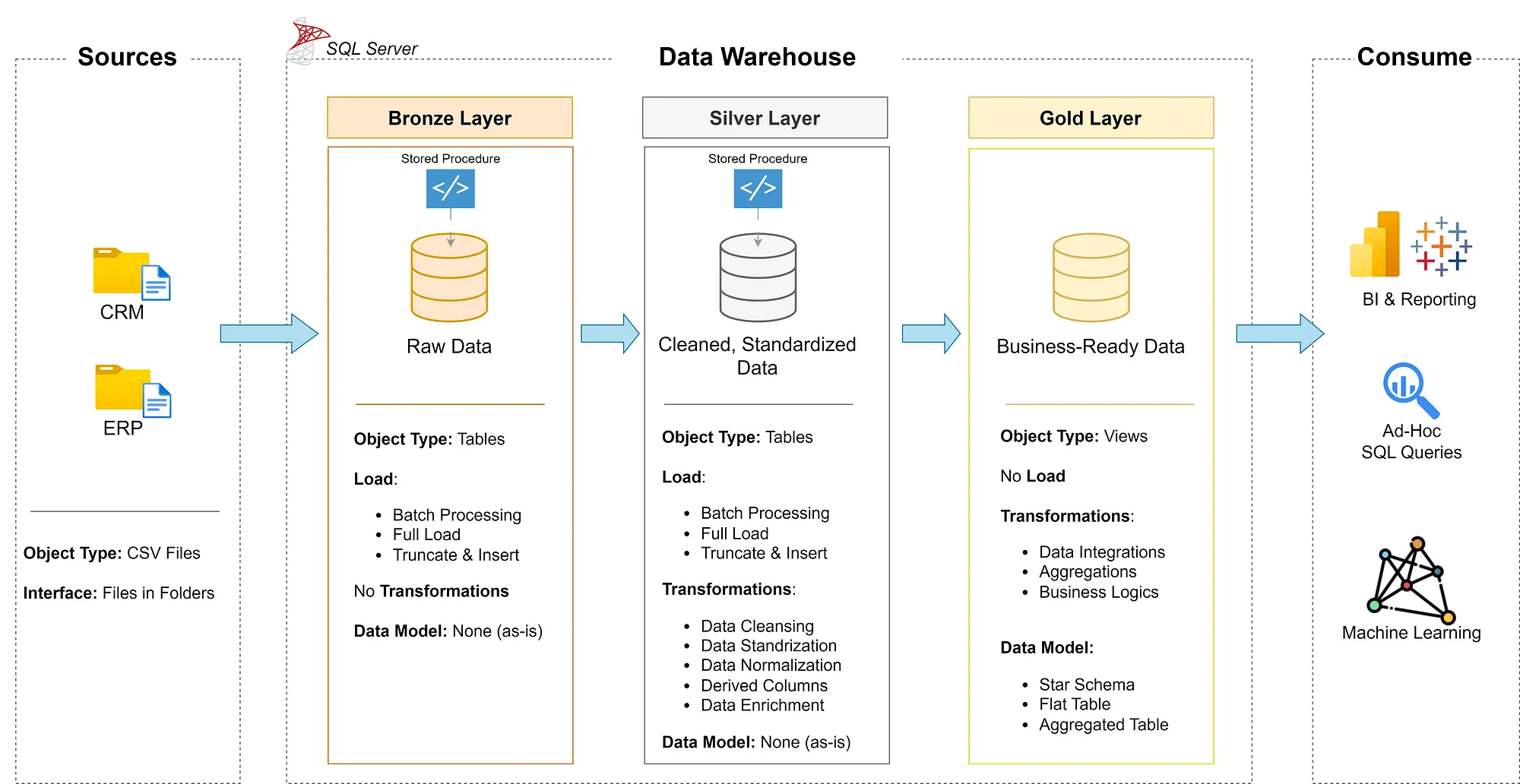
This project demonstrates a comprehensive data warehousing and analytics solution, from building a data warehouse to generating actionable insights.
What you will learn:
Data Architecture: Designing a Modern Data Warehouse Using Medallion Architecture Bronze, Silver, and Gold layers.
ETL Pipelines: Extracting, transforming, and loading data from source systems into the warehouse.
Data Modeling: Developing fact and dimension tables optimized for analytical queries.
Analytics & Reporting: Creating SQL-based reports and dashboards for actionable insights.
What is a Data Warehouse
A data warehouse is a data management system. it is a subject-oriented, integrated, and non-volatile collection of data.
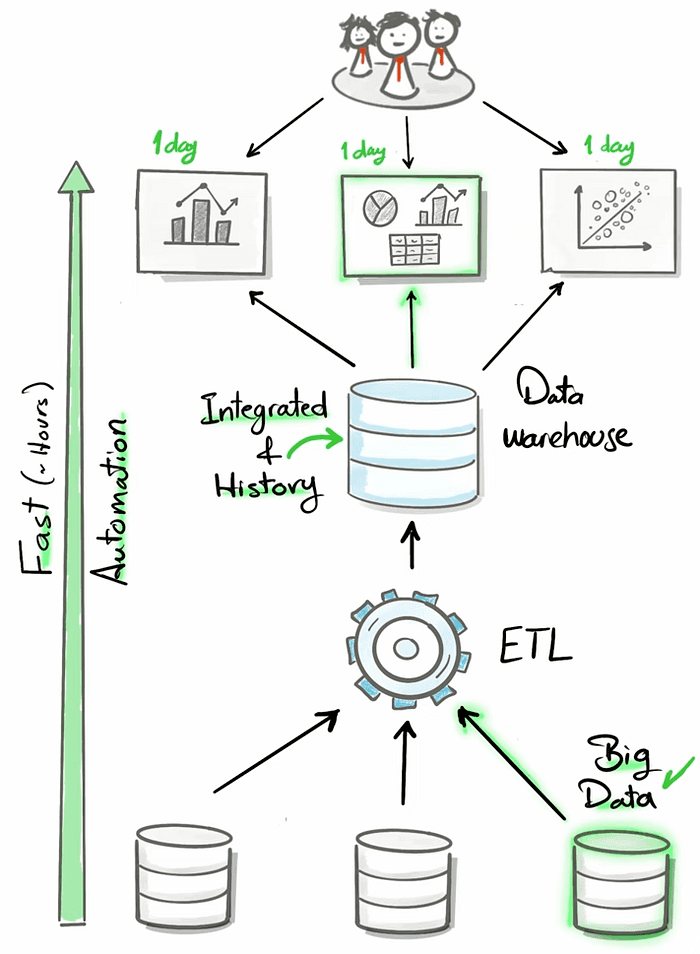
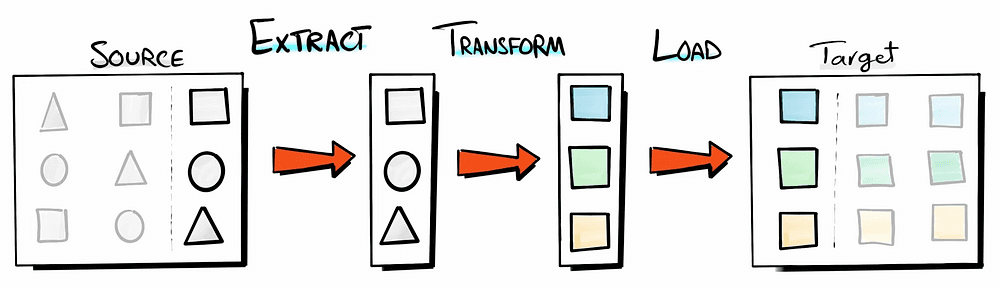
What is an ETL
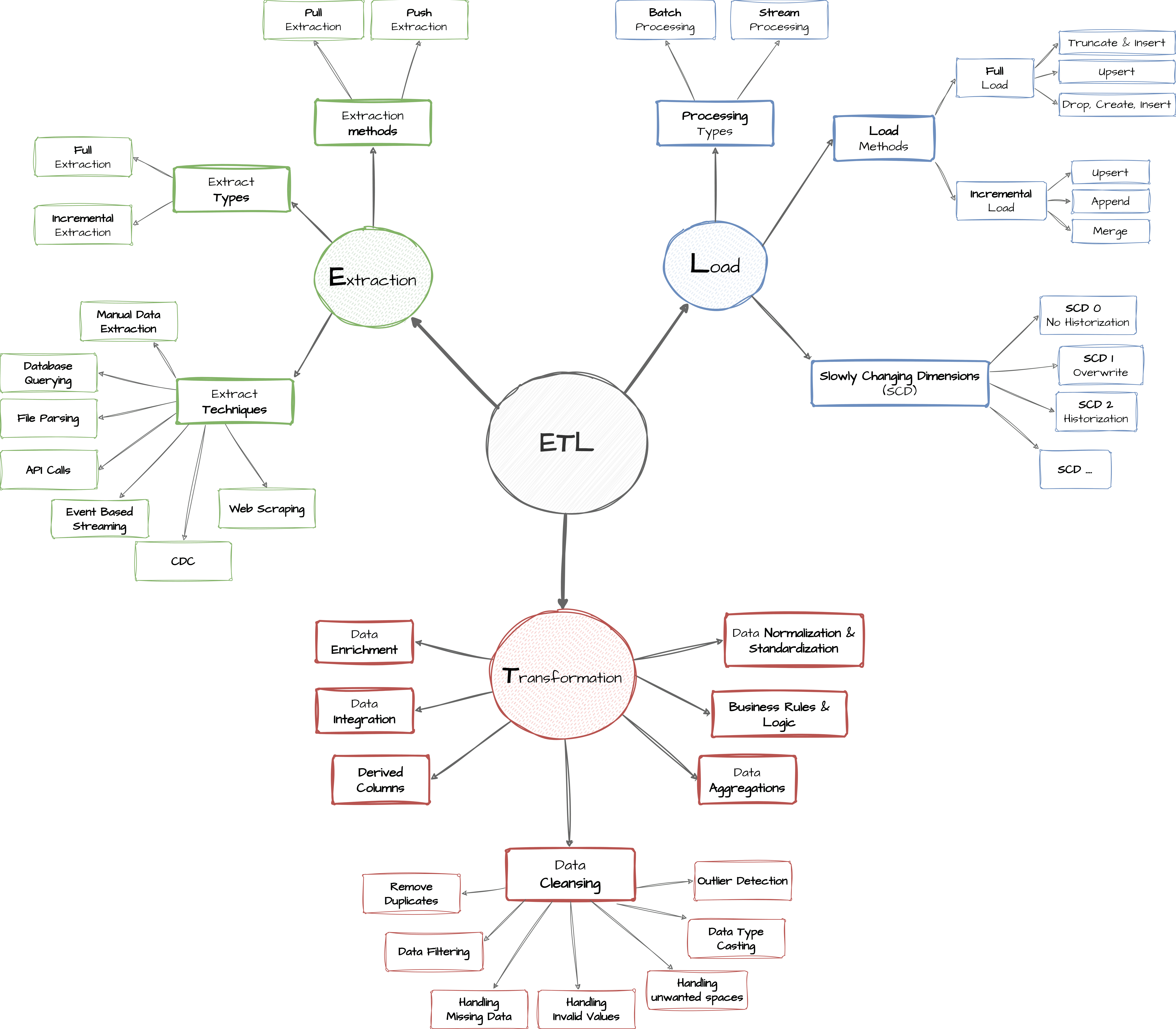
Extract: extracting the data as it is from the source and in case of incremental load, extracting a subset of the data from the source.
Transform: do manipulation and transformation to this data e.g. data cleansing, integration, formatting, normalization, etc.
Load: store the prepared data and move it to its target destination.
You sometimes don’t need to use a full ETL in the different steps of the project, this is explained in the figure below:
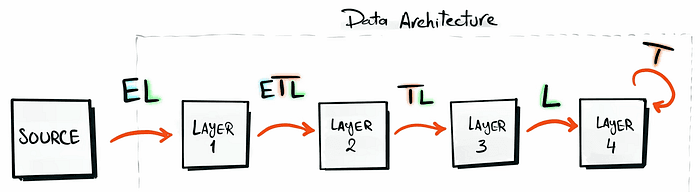
ETL Techniques
The following graph shows in detail the different ETL techniques:
The main steps of this project are:
Requirements analysis
Designing a data architecture
Building the bronze, silver, and gold layers
Step 1: Project Setup
Download the following tools:
SQL Server Express: Lightweight server for hosting your SQL database.
SQL Server Management Studio (SSMS): GUI for managing and interacting with databases.
Set up a GitHub account and repository to efficiently manage, version, and collaborate on your code.
DrawIO: Design data architecture, models, flows, and diagrams
All project resources and the source code can be found on GitHub.
Step 2: Building the Data Warehouse
Objective
Develop a modern data warehouse using SQL Server to consolidate sales data, enabling analytical reporting.
Data Sources: Import data from two source systems (ERP and CRM) provided as CSV files.
Data Quality: Cleanse and resolve data quality issues before analysis.
Integration: Combine both sources into a user-friendly data model for analytical queries.
Scope: Focus on the latest dataset only; historization of data is not required.
Documentation: Provide clear data model documentation to support both business stakeholders and analytics teams.
Data Architecture
There are 4 types of data architecture, which are the following:
Data Warehouse: Suitable for structured data
Data lake: Flexible than the data warehouse suitable for semi-structured and unstructured data (data for Machine Learning)
Data Lakehouse: a mix between the data warehouse & Data Lake
Data Mesh: Decentralized data management system (multiple departments where each one of them is building data product and sharing it)
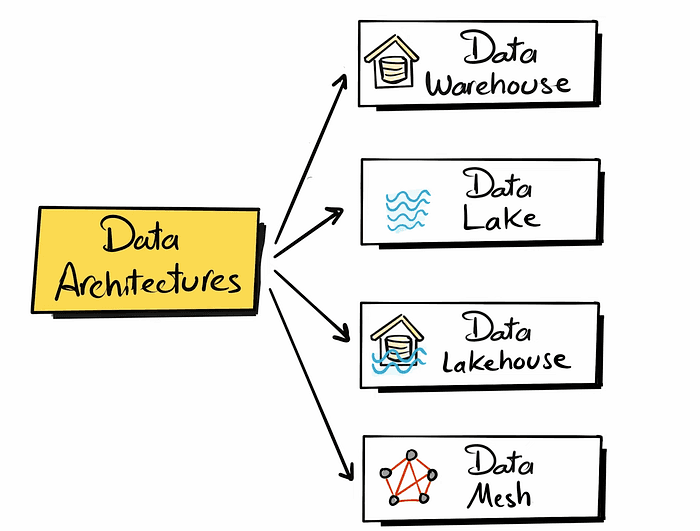
In this project, we are focusing on building a data warehouse.
There are four different approaches to building a data warehouse:
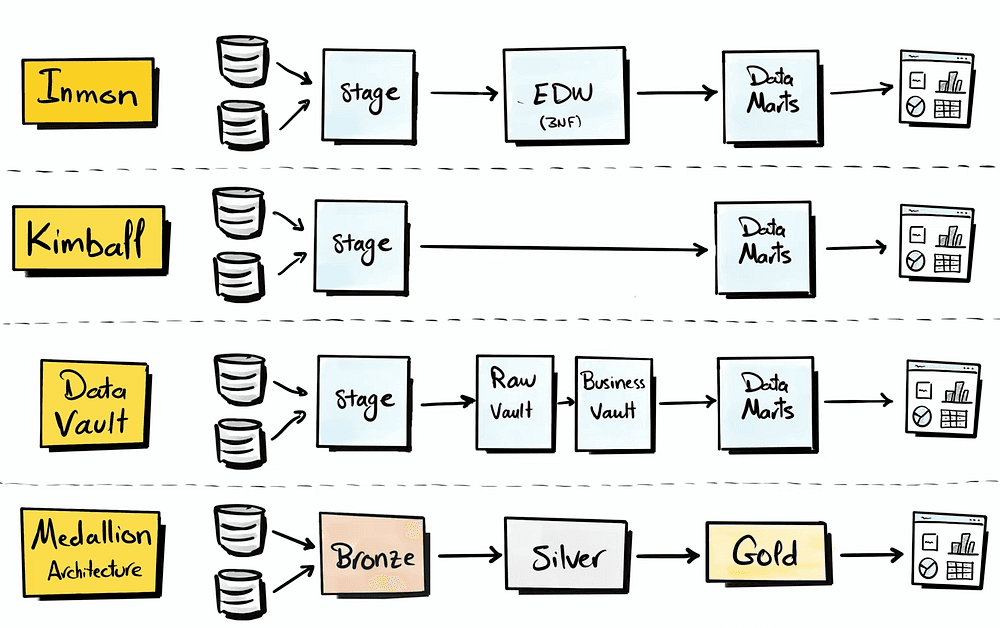
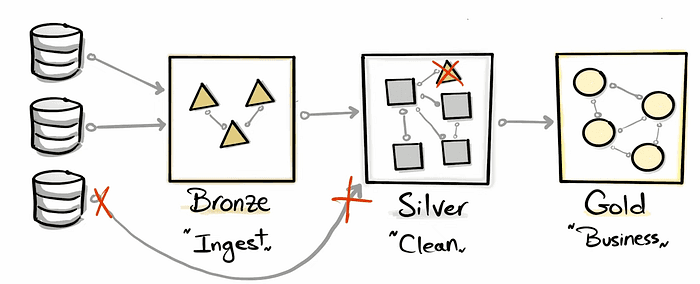
In this project, we will be using the Medallion architecture.
Designing the layers of the data warehouse
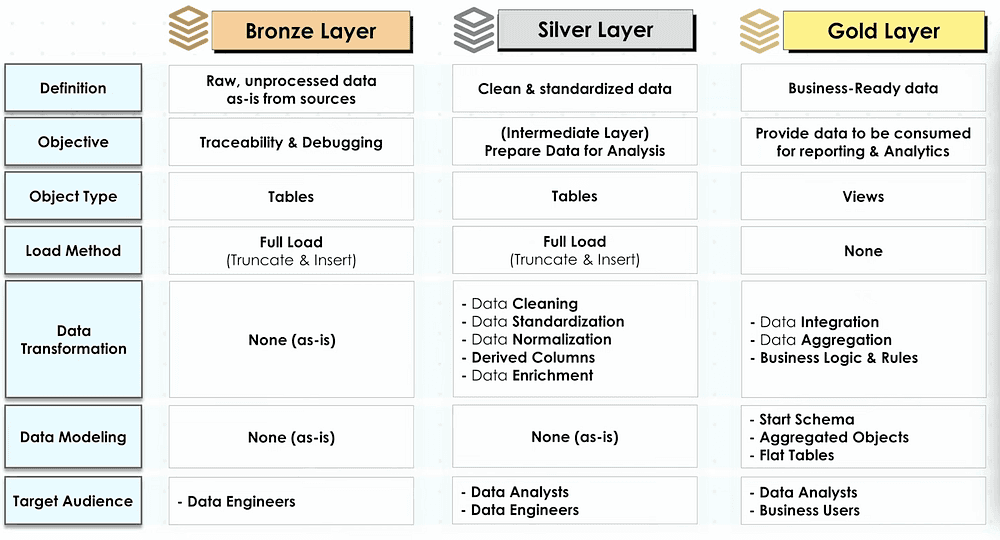
Separation of Concerns
As you design an architecture it is important to break down the complex components into smaller independent parts.
Press enter or click to view image in full size
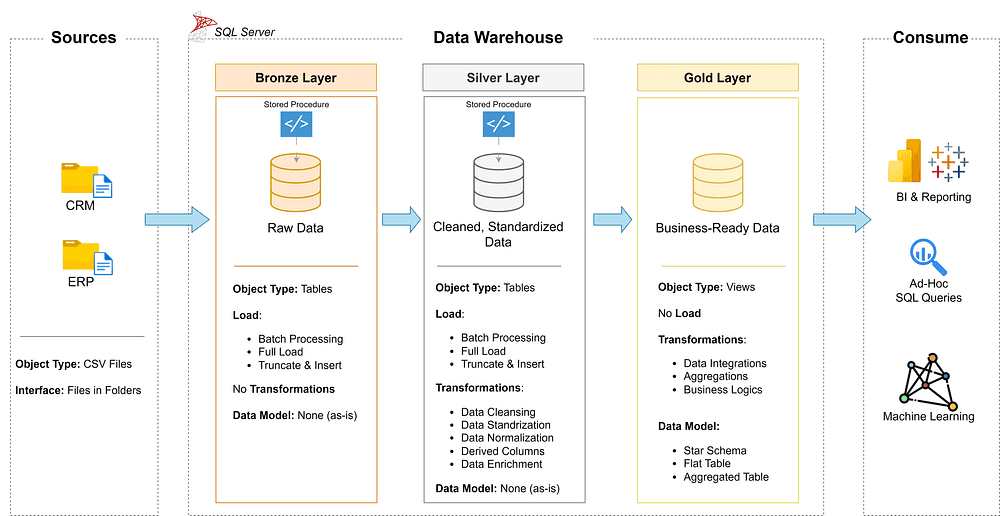
High-level Architecture
To draft this architecture, I used Drow.io
Naming Conventions
At the beginning of every DE project, it is essential to set Rules or Guidelines for naming the project's components, such as the Database, Schema, Tables, Stored procedures, etc.
All the details about the naming conventions are documented in this file.
Create Database & Schema
After creating a connection to SQL Server, navigate to Azure Data Studio. Start by Creating the database and calling it ‘DataWarehouse’.
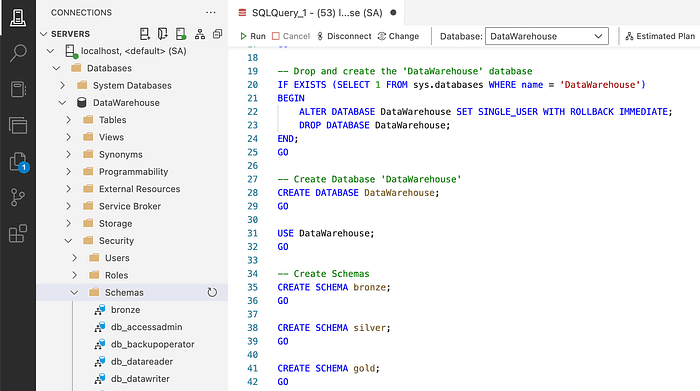
Thr GO command says to execute te instruction completely before going to the next
Then, we need to commit this code to Gi,t which can be found here.
Bronze Laye

Analyzing: Source System
Some common questions to ask the source system expert are:
What business process does it support (financial reporting)
How the data is stored (on-premise, e.g., SQL Server, Cloud)
Integration capabilities, e.g., API, Kafka, File extract, etc.
Incremental vs Full Loads
Data scope & historical needs (e.g., data from the past 2 years)
Authentication & authorization to access data, e.g. tokens, VPN, etc
Coding
DDL (Data Definition Language) defines the structure of database tables. You can obtain it by asking for metadata or by performing data profiling to identify column names and data types.
Since we have two sources, CRM & ERP, we need to create a DDL for each of the files in our sources, as shown below:
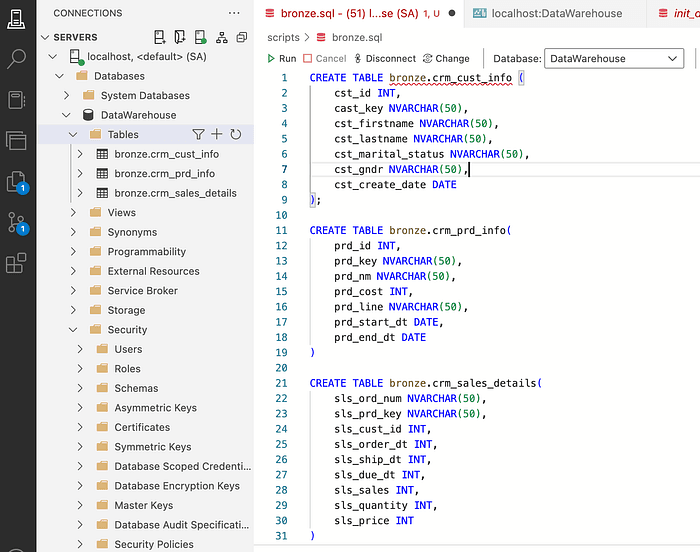
CRM Tables DDL
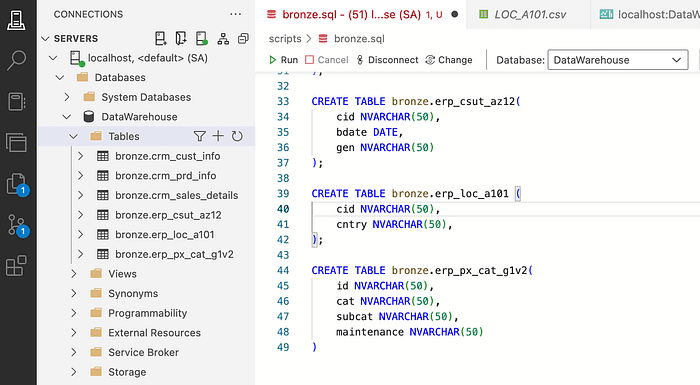
ERP Tables DDL
One thing to keep in mind when creating these tables is that if you need to re-run the table creation command, you will get an error. That’s why we need to add the logic for checking if the tables exist to drop them before every create table script.
IF OBJECT_ID ('bronze.<table_name>' , 'U') IS NOT NULL DROP TABLE bronze.<table_name>;IF OBJECT_ID ('bronze.<table_name>' , 'U') IS NOT NULL DROP TABLE bronze.<table_name>;IF OBJECT_ID ('bronze.<table_name>' , 'U') IS NOT NULL DROP TABLE bronze.<table_name>;At this stage, you have created all the bronze layer tables, but they are still empty. So the next step is to load the data into them.
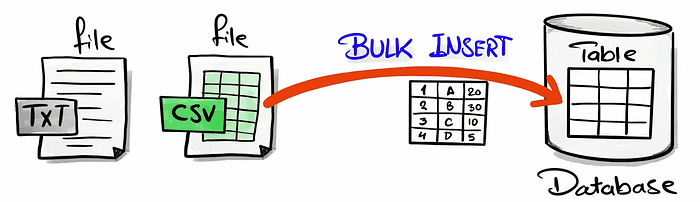
Bulk insert if a fast method to load in one go all the big data to the database
We need to create a stored procedure to achieve the data load.
Since the source data is stored in Azure Blob Storage. It is important to perform the following steps to grant the SQL server access to read from the Azure storage via the SAS (SHARED ACCESS SIGNATURE)
-- Create a Master Key -- Which is required to create database scoped credentials since the blob storage -- is not configured to allow public (anonymous) access. CREATE MASTER KEYENCRYPTION BY PASSWORD= 'MasterkeyPassword*'GO-- Create a database scope credentials - SASCREATE DATABASE SCOPED CREDENTIAL [https:
-- Create a Master Key -- Which is required to create database scoped credentials since the blob storage -- is not configured to allow public (anonymous) access. CREATE MASTER KEYENCRYPTION BY PASSWORD= 'MasterkeyPassword*'GO-- Create a database scope credentials - SASCREATE DATABASE SCOPED CREDENTIAL [https:
-- Create a Master Key -- Which is required to create database scoped credentials since the blob storage -- is not configured to allow public (anonymous) access. CREATE MASTER KEYENCRYPTION BY PASSWORD= 'MasterkeyPassword*'GO-- Create a database scope credentials - SASCREATE DATABASE SCOPED CREDENTIAL [https:
After completing these steps, you can start the Bulk insert of the files into the bronze tables. As shown in the code snippet below:
-- Bulk insert crm cust_info table TRUNCATE TABLE bronze.crm_cust_info;SET NOCOUNT ON --reduce the network traffic by stopping the msg that shows the nb of rows affectedBULK INSERT bronze.crm_cust_infoFROM 'datasets/source_crm/cust_info.csv' -- within the container, he location of the fileWITH( DATA_SOURCE = 'dataset', FIRSTROW = 2, FIELDTERMINATOR = ',', TABLOCK -- Minimize the number of log records for the insert operation);
-- Bulk insert crm cust_info table TRUNCATE TABLE bronze.crm_cust_info;SET NOCOUNT ON --reduce the network traffic by stopping the msg that shows the nb of rows affectedBULK INSERT bronze.crm_cust_infoFROM 'datasets/source_crm/cust_info.csv' -- within the container, he location of the fileWITH( DATA_SOURCE = 'dataset', FIRSTROW = 2, FIELDTERMINATOR = ',', TABLOCK -- Minimize the number of log records for the insert operation);
-- Bulk insert crm cust_info table TRUNCATE TABLE bronze.crm_cust_info;SET NOCOUNT ON --reduce the network traffic by stopping the msg that shows the nb of rows affectedBULK INSERT bronze.crm_cust_infoFROM 'datasets/source_crm/cust_info.csv' -- within the container, he location of the fileWITH( DATA_SOURCE = 'dataset', FIRSTROW = 2, FIELDTERMINATOR = ',', TABLOCK -- Minimize the number of log records for the insert operation);
We need to repeat that process for all the files in the data folders.
One important thing to note is that these scripts should run daily to load the new data to the bronze layer. So, we need to save frequently used SQL code in “stored procedures” in databases.
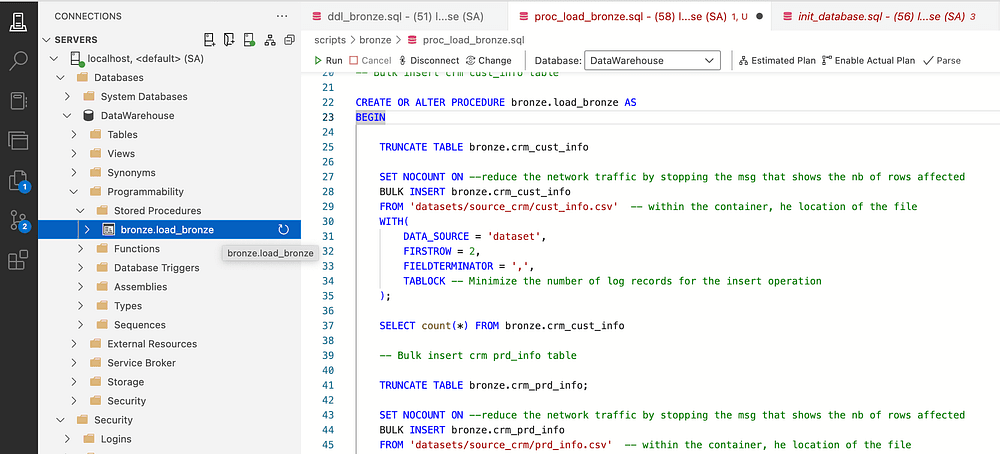
I also like to add information about the load duration of every layer and the bronze layer loading, which helps debug the script & identify bottlenecks.
Data Flow — Bronze Layer
It is important to draw the Data Flow at each layer; this will help have data lineage to be able to understand the source of the data.
This could be hard with a system that has a lot of tables but for medium to small Data Warehouses, this step will help have a clear view of the data flow from the sources to the different layers.
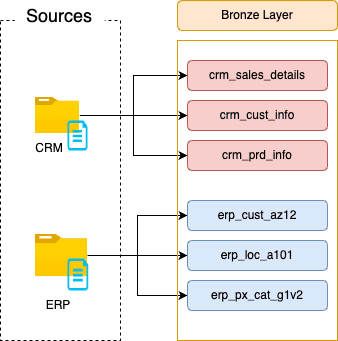
Bronze Layer — Data Flow
Silver Layer
In the silver layer, we need to transform the data after identifying the quality problems in the data and then coding the transformation script.
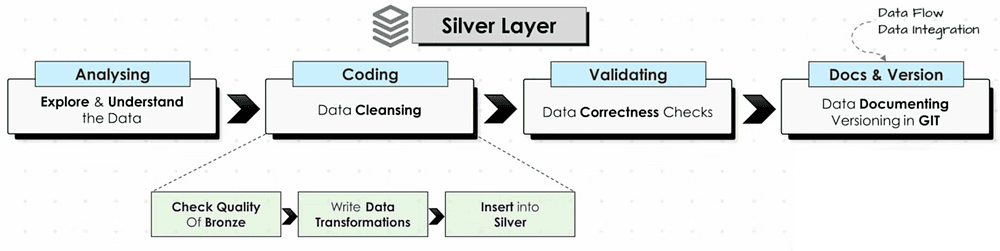
Exploring & Understanding the data
We need to understand each table in the bronze layer one by one and check the connection between them (how to join them). By executing a select statement per table.
SELECT TOP 1000 * FROM <table_name
SELECT TOP 1000 * FROM <table_name
SELECT TOP 1000 * FROM <table_name
To visualize the connection between the tables we can draw an integration diagram (how tables are related) with Draw.io.
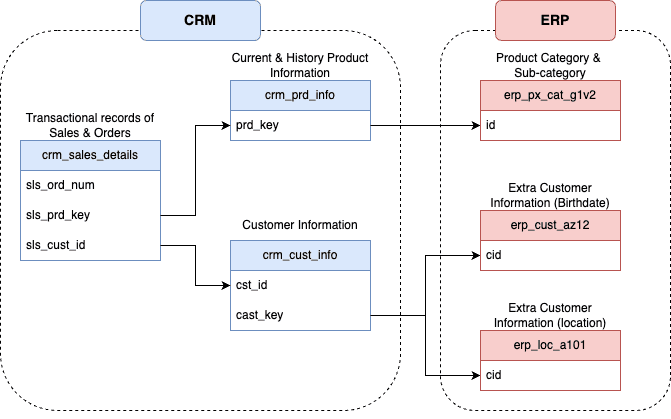
Data Integartion Model
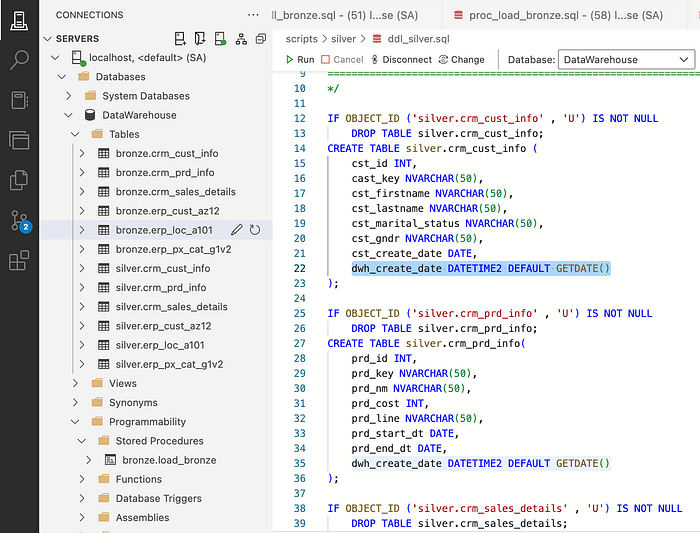
Creating DDL for Tables in the Silver Layer
The objective of the silver layer is to have clean and standardized data. With a full load (truncate & insert) from the bronze layer to the silver layer.
Metadata Columns
They are extra columns added by the data engineers that do not originate from the source data:
create_date: The record’s load timestamp
update_date: The records’s last update time stamp
source_system: The origin system of the record
file_location: The file source of the record
To create the DDL for the silver layer, we will just copy the same code that we had for the bronze layer and just replace the keyword ‘bronze.’ with ‘silver.’ and additionally, we will add an extra column for the creation data (and give it. a default value).
Data Quality Check
Before inserting the data in the silver tables or doing any transformations, it is very important to check the quality of the data and detect if there are any issues in the data. If we do not detect the issues, we can not solve them.
Here are some rule of thumb checks to always make:
- Check for duplicates or nulls in the primary keys
- Check unwanted space in string values
- Check the consistency in low cardinality columns
- Checking that dates columns are a real date & not a string
Check for Duplicates
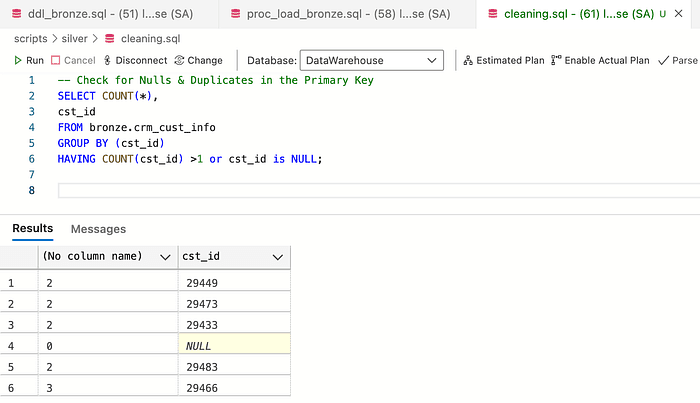
The screenshot above shows that the primary key has duplicated and Null values, which we need to fix.
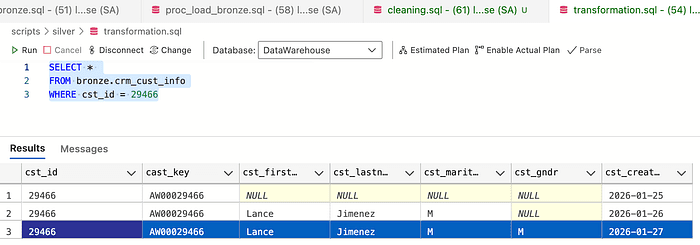
So if we check the screenshot below, I selected the rows with 3 duplicates for the same primary key. The strategy here is to take the latest create_date row with the most up-to-date information.
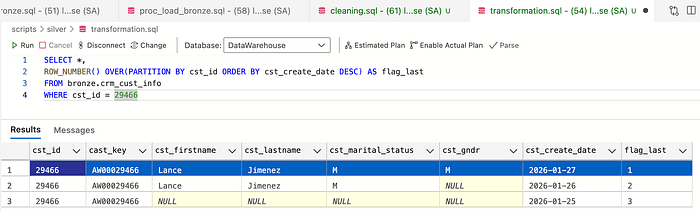
To fix this problem, I will use window functions to rank— ROW_NUMBER
Then, to remove duplicates, select only the rows with flag_last = 1
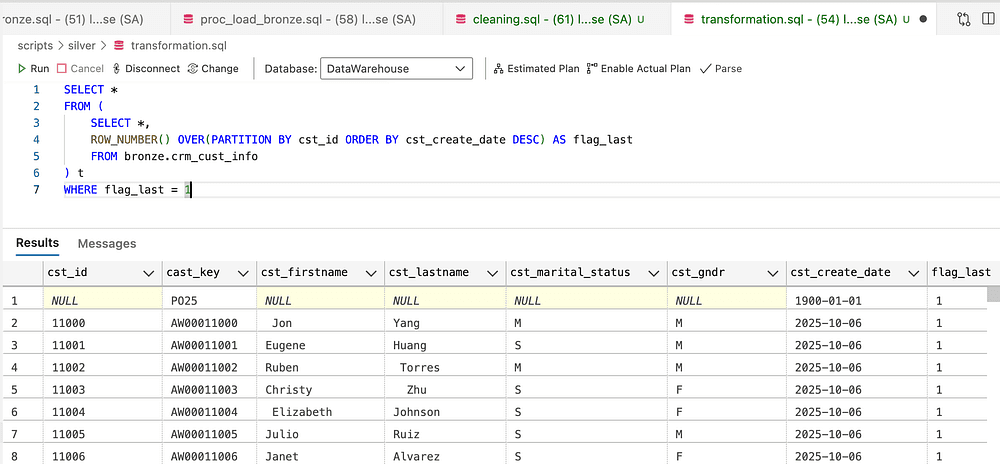
Removing duplicates
Check Unwanted
Spaces in Strings
The next check is for unwanted spaces. To detect them, we will use the TRIM function. When the value of the original does not match the trimmed string, it means that there is an unwanted space in it.
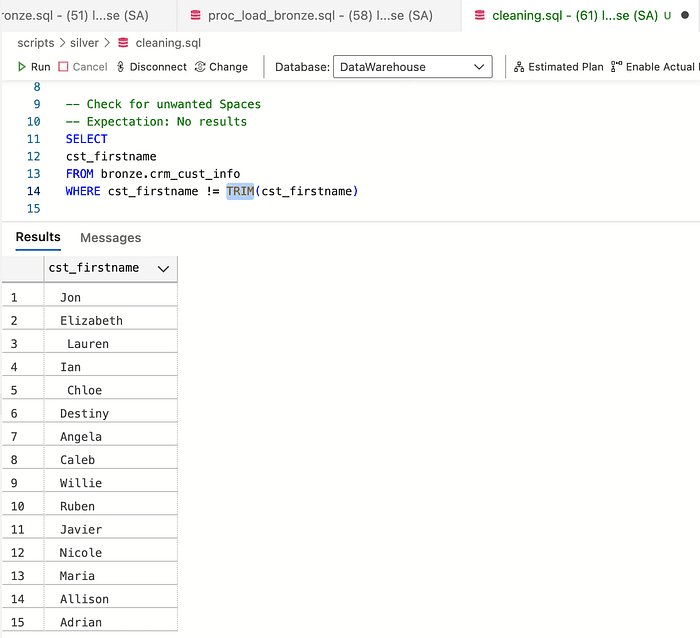
To get rid of the spaces in the strings columns, we use the function TRIM()
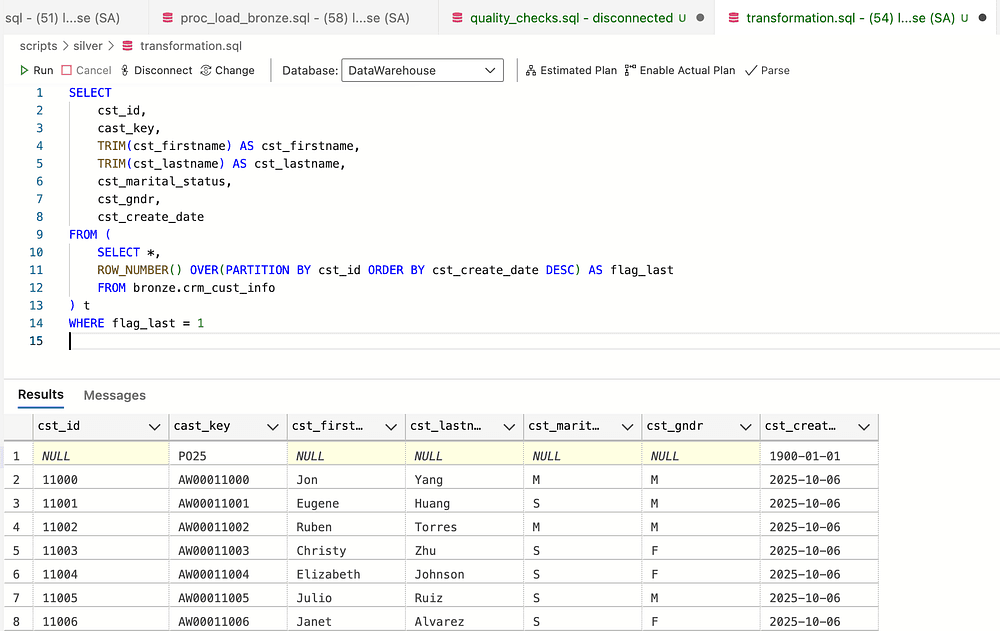
Removing unwanted spac
Check Standardization & Consistency
In low cardinality columns, it is important to check the consistency of the values and deal with Null values according to the conversion in the project. Let us first check the possible values via the DISTINCT() function.
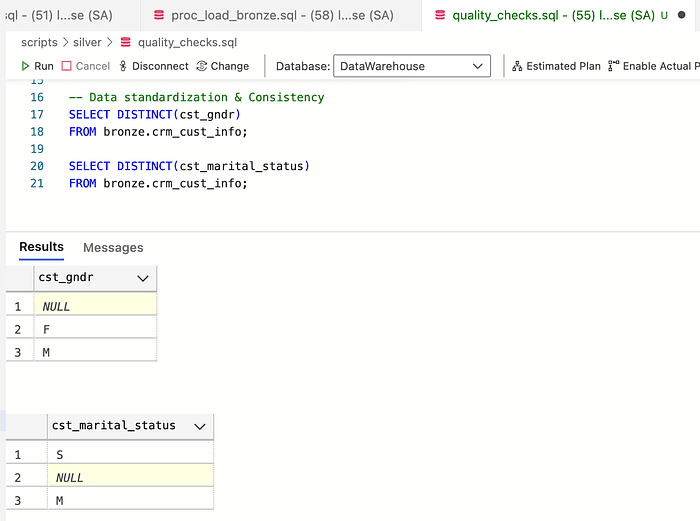
Then, to make the table more human-readable, I converted the short names to full gender names using the CASE WHEN statement. We do the same with marital status.
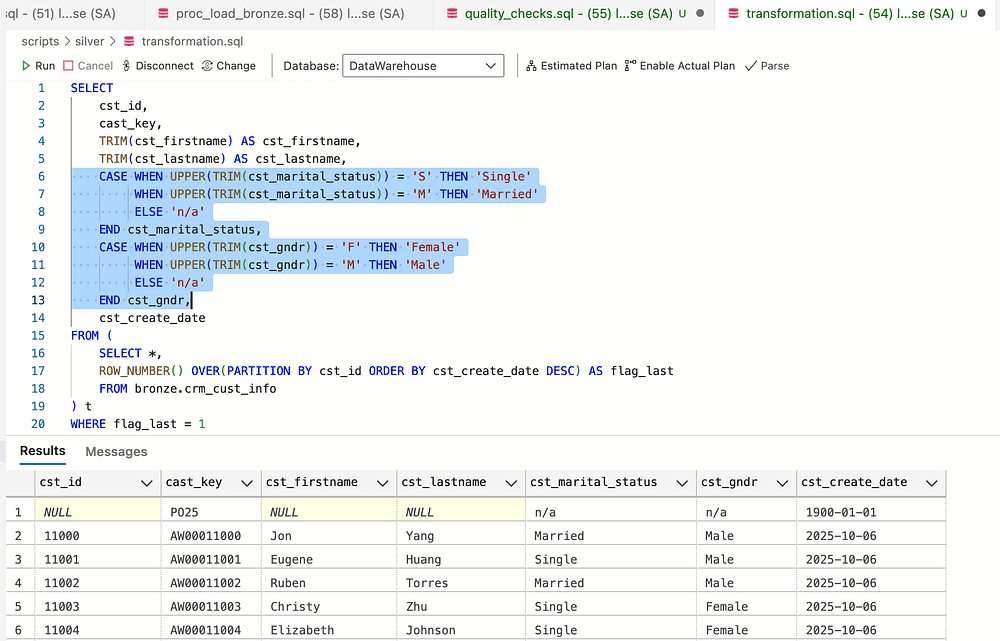
Use Upper & TRIM to catch edge cases
Checking Dates columns as dates, not strings
Since we defined in the table definition & schema the data type as the date for the column cst_create_date, we do not have to do anything.
Inserting data into the silver layer
After finishing all the transformations, it is time to insert the data into the silver layer
INSERT INTO silver.crm_cust_info( cst_id, cast_key, cst_firstname, cst_lastname, cst_marital_status, cst_gndr, cst_create_date)SELECT cst_id, cast_key, TRIM(cst_firstname) AS cst_firstname, TRIM(cst_lastname) AS cst_lastname, CASE WHEN UPPER(TRIM(cst_marital_status)) = 'S' THEN 'Single' WHEN UPPER(TRIM(cst_marital_status)) = 'M' THEN 'Married' ELSE 'n/a' END cst_marital_status, -- Normmalize maritial status values to readable format CASE WHEN UPPER(TRIM(cst_gndr)) = 'F' THEN 'Female' WHEN UPPER(TRIM(cst_gndr)) = 'M' THEN 'Male' ELSE 'n/a' END cst_gndr, -- Normalize gender values to readable format cst_create_dateFROM ( SELECT *, ROW_NUMBER() OVER(PARTITION BY cst_id ORDER BY cst_create_date DESC) AS flag_last FROM bronze.crm_cust_info) t WHERE flag_last = 1 AND cst_id is NOT NULL -- removed duplicated by selecting most recent record per customer
INSERT INTO silver.crm_cust_info( cst_id, cast_key, cst_firstname, cst_lastname, cst_marital_status, cst_gndr, cst_create_date)SELECT cst_id, cast_key, TRIM(cst_firstname) AS cst_firstname, TRIM(cst_lastname) AS cst_lastname, CASE WHEN UPPER(TRIM(cst_marital_status)) = 'S' THEN 'Single' WHEN UPPER(TRIM(cst_marital_status)) = 'M' THEN 'Married' ELSE 'n/a' END cst_marital_status, -- Normmalize maritial status values to readable format CASE WHEN UPPER(TRIM(cst_gndr)) = 'F' THEN 'Female' WHEN UPPER(TRIM(cst_gndr)) = 'M' THEN 'Male' ELSE 'n/a' END cst_gndr, -- Normalize gender values to readable format cst_create_dateFROM ( SELECT *, ROW_NUMBER() OVER(PARTITION BY cst_id ORDER BY cst_create_date DESC) AS flag_last FROM bronze.crm_cust_info) t WHERE flag_last = 1 AND cst_id is NOT NULL -- removed duplicated by selecting most recent record per customer
INSERT INTO silver.crm_cust_info( cst_id, cast_key, cst_firstname, cst_lastname, cst_marital_status, cst_gndr, cst_create_date)SELECT cst_id, cast_key, TRIM(cst_firstname) AS cst_firstname, TRIM(cst_lastname) AS cst_lastname, CASE WHEN UPPER(TRIM(cst_marital_status)) = 'S' THEN 'Single' WHEN UPPER(TRIM(cst_marital_status)) = 'M' THEN 'Married' ELSE 'n/a' END cst_marital_status, -- Normmalize maritial status values to readable format CASE WHEN UPPER(TRIM(cst_gndr)) = 'F' THEN 'Female' WHEN UPPER(TRIM(cst_gndr)) = 'M' THEN 'Male' ELSE 'n/a' END cst_gndr, -- Normalize gender values to readable format cst_create_dateFROM ( SELECT *, ROW_NUMBER() OVER(PARTITION BY cst_id ORDER BY cst_create_date DESC) AS flag_last FROM bronze.crm_cust_info) t WHERE flag_last = 1 AND cst_id is NOT NULL -- removed duplicated by selecting most recent record per customer
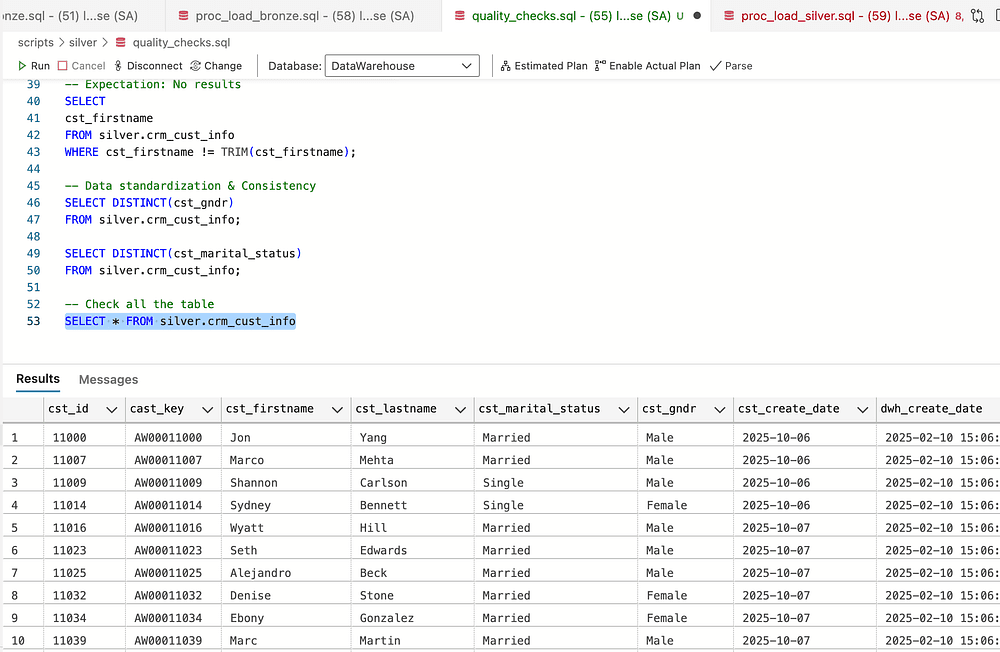
We have completed this work for the first table and will continue using the same process for the rest of the tables in the bronze layer before inserting them into the silver layer.
One important case of data quality was the case in this data in the crm_prd_info table. The issue is that the prd_end_dt was smaller for some products than the prd_start_dt. To fix this issue, the following rule was adopted:
end_date = start date of the next record — 1
To implement this rule in SQL, I used the following approach:
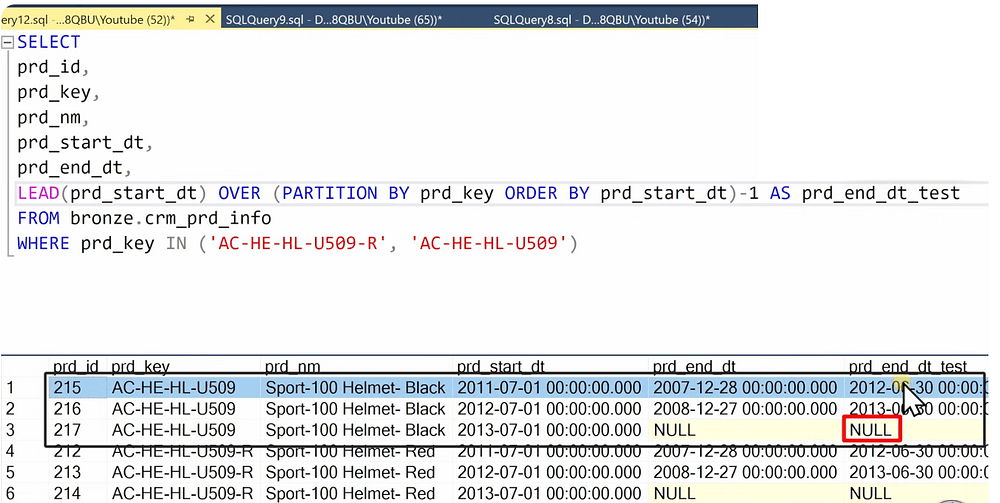
Another note: In this table, a column was split into two new columns, which should be reflected in the DDL definition of the table.
The procedure to insert data into the silver layer for the crm_prd_info:
TRUNCATE TABLE silver.crm_prd_info;INSERT INTO silver.crm_prd_info( prd_id, cat_id, prd_key, prd_nm, prd_cost, prd_line, prd_start_dt, prd_end_dt)SELECT prd_id, REPLACE(SUBSTRING(prd_key, 1, 5), '-', '_') AS cat_id, SUBSTRING(prd_key, 7, LEN(prd_key)) AS prd_key, prd_nm, ISNULL(prd_cost, 0) AS prd_cost, CASE WHEN UPPER(TRIM(prd_line)) = 'M' THEN 'Mountain' WHEN UPPER(TRIM(prd_line)) = 'R' THEN 'Road' WHEN UPPER(TRIM(prd_line)) = 'S' THEN 'Other Sales' WHEN UPPER(TRIM(prd_line)) = 'T' THEN 'Touring' ELSE 'n/a' END AS prd_line, prd_start_dt, -- the new end_date = start data of next record - 1 day (in the case where end_dt is smaller than start date) DATEADD(day, -1, LEAD(prd_start_dt) OVER (PARTITION BY prd_key ORDER BY prd_start_dt)) AS prd_end_dt -- to substract a dayFROM bronze.crm_prd_info;
TRUNCATE TABLE silver.crm_prd_info;INSERT INTO silver.crm_prd_info( prd_id, cat_id, prd_key, prd_nm, prd_cost, prd_line, prd_start_dt, prd_end_dt)SELECT prd_id, REPLACE(SUBSTRING(prd_key, 1, 5), '-', '_') AS cat_id, SUBSTRING(prd_key, 7, LEN(prd_key)) AS prd_key, prd_nm, ISNULL(prd_cost, 0) AS prd_cost, CASE WHEN UPPER(TRIM(prd_line)) = 'M' THEN 'Mountain' WHEN UPPER(TRIM(prd_line)) = 'R' THEN 'Road' WHEN UPPER(TRIM(prd_line)) = 'S' THEN 'Other Sales' WHEN UPPER(TRIM(prd_line)) = 'T' THEN 'Touring' ELSE 'n/a' END AS prd_line, prd_start_dt, -- the new end_date = start data of next record - 1 day (in the case where end_dt is smaller than start date) DATEADD(day, -1, LEAD(prd_start_dt) OVER (PARTITION BY prd_key ORDER BY prd_start_dt)) AS prd_end_dt -- to substract a dayFROM bronze.crm_prd_info;
TRUNCATE TABLE silver.crm_prd_info;INSERT INTO silver.crm_prd_info( prd_id, cat_id, prd_key, prd_nm, prd_cost, prd_line, prd_start_dt, prd_end_dt)SELECT prd_id, REPLACE(SUBSTRING(prd_key, 1, 5), '-', '_') AS cat_id, SUBSTRING(prd_key, 7, LEN(prd_key)) AS prd_key, prd_nm, ISNULL(prd_cost, 0) AS prd_cost, CASE WHEN UPPER(TRIM(prd_line)) = 'M' THEN 'Mountain' WHEN UPPER(TRIM(prd_line)) = 'R' THEN 'Road' WHEN UPPER(TRIM(prd_line)) = 'S' THEN 'Other Sales' WHEN UPPER(TRIM(prd_line)) = 'T' THEN 'Touring' ELSE 'n/a' END AS prd_line, prd_start_dt, -- the new end_date = start data of next record - 1 day (in the case where end_dt is smaller than start date) DATEADD(day, -1, LEAD(prd_start_dt) OVER (PARTITION BY prd_key ORDER BY prd_start_dt)) AS prd_end_dt -- to substract a dayFROM bronze.crm_prd_info;
One other common issue in the data, in particular in the crm_sales_details, is sales data and its relation to quantity and price. As follows, we can check these inconsistencies:
-- Check data consistency between sales, quantity and price -- >> Business rule: sales = quantity * price -- >> sales can not be negative, NULL or zeros SELECTsls_price,sls_quantity,sls_salesFROM bronze.crm_sales_detailsWHERE sls_sales != sls_quantity * sls_priceOR sls_sales is NULL OR sls_price is NULL OR sls_quantity is NULL OR sls_sales <=0 OR sls_price <=0 OR sls_quantity <=0
-- Check data consistency between sales, quantity and price -- >> Business rule: sales = quantity * price -- >> sales can not be negative, NULL or zeros SELECTsls_price,sls_quantity,sls_salesFROM bronze.crm_sales_detailsWHERE sls_sales != sls_quantity * sls_priceOR sls_sales is NULL OR sls_price is NULL OR sls_quantity is NULL OR sls_sales <=0 OR sls_price <=0 OR sls_quantity <=0
-- Check data consistency between sales, quantity and price -- >> Business rule: sales = quantity * price -- >> sales can not be negative, NULL or zeros SELECTsls_price,sls_quantity,sls_salesFROM bronze.crm_sales_detailsWHERE sls_sales != sls_quantity * sls_priceOR sls_sales is NULL OR sls_price is NULL OR sls_quantity is NULL OR sls_sales <=0 OR sls_price <=0 OR sls_quantity <=0
In this case and in such situations, you need to check with an expert from the business side, to be able to find a fitting way to solve the problem.
There are two solutions:
Solution #1: Data issues will be fixed in the source system
Solution #2: Data issues will be fixed in the data warehouse
These are the rules that will be followed to solve the problem.

the code I used to solve the problem:
INSERT INTO silver.crm_sales_details ( sls_ord_num, sls_prd_key, sls_cust_id, sls_order_dt, sls_ship_dt, sls_due_dt, sls_sales, sls_quantity, sls_price )SELECT sls_ord_num, sls_prd_key, sls_cust_id, CASE WHEN sls_order_dt = 0 OR LEN(sls_order_dt) != 8 THEN NULL ELSE CAST(CAST(sls_order_dt AS VARCHAR) AS DATE) END AS sls_order_dt, CASE WHEN sls_ship_dt = 0 OR LEN(sls_ship_dt) != 8 THEN NULL ELSE CAST(CAST(sls_ship_dt AS VARCHAR) AS DATE) END AS sls_ship_dt, CASE WHEN sls_due_dt = 0 OR LEN(sls_due_dt) != 8 THEN NULL ELSE CAST(CAST(sls_due_dt AS VARCHAR) AS DATE) END AS sls_due_dt, CASE WHEN sls_sales IS NULL OR sls_sales <= 0 OR sls_sales != sls_quantity * ABS(sls_price) THEN sls_quantity * ABS(sls_price) ELSE sls_sales END AS sls_sales, -- Recalculate sales if original value is missing or incorrect sls_quantity, CASE WHEN sls_price IS NULL OR sls_price <= 0 THEN sls_sales / NULLIF(sls_quantity, 0) ELSE sls_price -- Derive price if original value is invalid END AS sls_priceFROM bronze.crm_sales_details;
INSERT INTO silver.crm_sales_details ( sls_ord_num, sls_prd_key, sls_cust_id, sls_order_dt, sls_ship_dt, sls_due_dt, sls_sales, sls_quantity, sls_price )SELECT sls_ord_num, sls_prd_key, sls_cust_id, CASE WHEN sls_order_dt = 0 OR LEN(sls_order_dt) != 8 THEN NULL ELSE CAST(CAST(sls_order_dt AS VARCHAR) AS DATE) END AS sls_order_dt, CASE WHEN sls_ship_dt = 0 OR LEN(sls_ship_dt) != 8 THEN NULL ELSE CAST(CAST(sls_ship_dt AS VARCHAR) AS DATE) END AS sls_ship_dt, CASE WHEN sls_due_dt = 0 OR LEN(sls_due_dt) != 8 THEN NULL ELSE CAST(CAST(sls_due_dt AS VARCHAR) AS DATE) END AS sls_due_dt, CASE WHEN sls_sales IS NULL OR sls_sales <= 0 OR sls_sales != sls_quantity * ABS(sls_price) THEN sls_quantity * ABS(sls_price) ELSE sls_sales END AS sls_sales, -- Recalculate sales if original value is missing or incorrect sls_quantity, CASE WHEN sls_price IS NULL OR sls_price <= 0 THEN sls_sales / NULLIF(sls_quantity, 0) ELSE sls_price -- Derive price if original value is invalid END AS sls_priceFROM bronze.crm_sales_details;
INSERT INTO silver.crm_sales_details ( sls_ord_num, sls_prd_key, sls_cust_id, sls_order_dt, sls_ship_dt, sls_due_dt, sls_sales, sls_quantity, sls_price )SELECT sls_ord_num, sls_prd_key, sls_cust_id, CASE WHEN sls_order_dt = 0 OR LEN(sls_order_dt) != 8 THEN NULL ELSE CAST(CAST(sls_order_dt AS VARCHAR) AS DATE) END AS sls_order_dt, CASE WHEN sls_ship_dt = 0 OR LEN(sls_ship_dt) != 8 THEN NULL ELSE CAST(CAST(sls_ship_dt AS VARCHAR) AS DATE) END AS sls_ship_dt, CASE WHEN sls_due_dt = 0 OR LEN(sls_due_dt) != 8 THEN NULL ELSE CAST(CAST(sls_due_dt AS VARCHAR) AS DATE) END AS sls_due_dt, CASE WHEN sls_sales IS NULL OR sls_sales <= 0 OR sls_sales != sls_quantity * ABS(sls_price) THEN sls_quantity * ABS(sls_price) ELSE sls_sales END AS sls_sales, -- Recalculate sales if original value is missing or incorrect sls_quantity, CASE WHEN sls_price IS NULL OR sls_price <= 0 THEN sls_sales / NULLIF(sls_quantity, 0) ELSE sls_price -- Derive price if original value is invalid END AS sls_priceFROM bronze.crm_sales_details;
At this stage we have finished the preparation and creation of the silver layer which now has clean, normalized and transformed data. The next step is to create relations between the tables and model the data in order to make it usable for reporting purposes.
Gold Layer
At this stage, we will create views so we won’t need to use stored procedures. To model the data, joins between tables will be created according to the integration model defined in earlier steps.
Note: When creating joins between tables, avoid using inner join because they may result in losing data while left join with the master table grants that all the data is present in the resulting table.
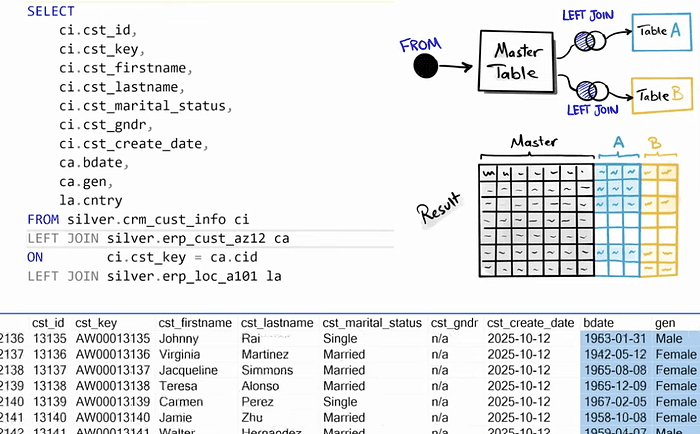
After joing the tables, make sure to check if any duplicates were created during the join process. By grouping the data by the customer id and selecting the count(customer_id) from the sub query of joining the tables.
Solving data integration issues
When making joins data integration problems can occur.
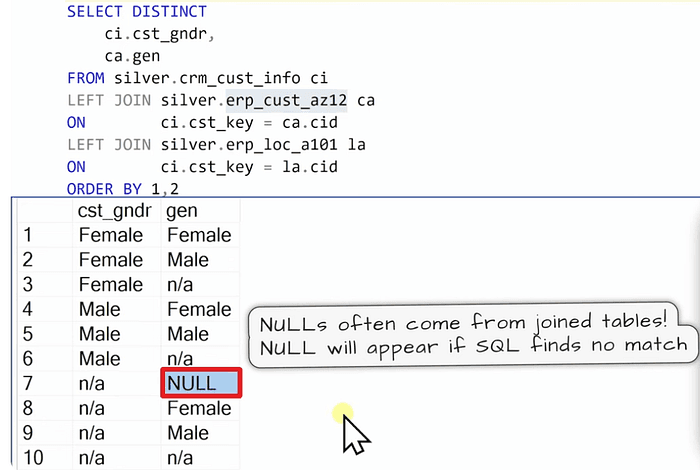
We add these few lines on top of the query:
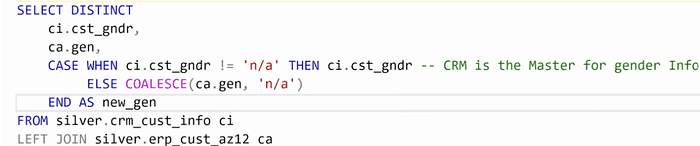
Another important step in the gold layer is to rename the columns to make them user friendly and still following the naming convention agreed on since the start of the project.
Dimension Tables
When joining the tables there comes the important question of deciding whether it is a dimension or a fact table.
A rule of Thumb is when the columns of a table are descriptive, then it is more likely a dimension.
Surrogate Key: System-generated unique identifier assigned to each record in a table. It is not a business key but it is only used to connect our data model.
To define a surrogate key, we can use a DDL based generation or a more simpler approach using a query with window function (Row_Number).
IF OBJECT_ID('gold.dim_customers', 'V') IS NOT NULL DROP VIEW gold.dim_customers;GOCREATE VIEW gold.dim_customers ASSELECT ROW_NUMBER() OVER (ORDER BY cst_id) AS customer_key, -- Surrogate key ci.cst_id AS customer_id, ci.cst_key AS customer_number, ci.cst_firstname AS first_name, ci.cst_lastname AS last_name, la.cntry AS country, ci.cst_marital_status AS marital_status, CASE WHEN ci.cst_gndr != 'n/a' THEN ci.cst_gndr -- CRM is the primary source for gender ELSE COALESCE(ca.gen, 'n/a') -- Fallback to ERP data / The COALESCE is used to return the first non-null value from a list. END AS gender, ca.bdate AS birthdate, ci.cst_create_date AS create_dateFROM silver.crm_cust_info ciLEFT JOIN silver.erp_cust_az12 ca ON ci.cst_key = ca.cidLEFT JOIN silver.erp_loc_a101 la ON ci.cst_key = la.cid;GOIF OBJECT_ID('gold.dim_customers', 'V') IS NOT NULL DROP VIEW gold.dim_customers;GOCREATE VIEW gold.dim_customers ASSELECT ROW_NUMBER() OVER (ORDER BY cst_id) AS customer_key, -- Surrogate key ci.cst_id AS customer_id, ci.cst_key AS customer_number, ci.cst_firstname AS first_name, ci.cst_lastname AS last_name, la.cntry AS country, ci.cst_marital_status AS marital_status, CASE WHEN ci.cst_gndr != 'n/a' THEN ci.cst_gndr -- CRM is the primary source for gender ELSE COALESCE(ca.gen, 'n/a') -- Fallback to ERP data / The COALESCE is used to return the first non-null value from a list. END AS gender, ca.bdate AS birthdate, ci.cst_create_date AS create_dateFROM silver.crm_cust_info ciLEFT JOIN silver.erp_cust_az12 ca ON ci.cst_key = ca.cidLEFT JOIN silver.erp_loc_a101 la ON ci.cst_key = la.cid;GOIF OBJECT_ID('gold.dim_customers', 'V') IS NOT NULL DROP VIEW gold.dim_customers;GOCREATE VIEW gold.dim_customers ASSELECT ROW_NUMBER() OVER (ORDER BY cst_id) AS customer_key, -- Surrogate key ci.cst_id AS customer_id, ci.cst_key AS customer_number, ci.cst_firstname AS first_name, ci.cst_lastname AS last_name, la.cntry AS country, ci.cst_marital_status AS marital_status, CASE WHEN ci.cst_gndr != 'n/a' THEN ci.cst_gndr -- CRM is the primary source for gender ELSE COALESCE(ca.gen, 'n/a') -- Fallback to ERP data / The COALESCE is used to return the first non-null value from a list. END AS gender, ca.bdate AS birthdate, ci.cst_create_date AS create_dateFROM silver.crm_cust_info ciLEFT JOIN silver.erp_cust_az12 ca ON ci.cst_key = ca.cidLEFT JOIN silver.erp_loc_a101 la ON ci.cst_key = la.cid;GOFact Tables
To recongnize the fact table, look at the columns and they should be showing transactions and events also there can be dates, etc.
To create a data model, it is necessary to connect the fact table with the dimension tables via the surrogate keys instead of IDs by doing joins of the silver layer of the fact table and the gold layer tables of the dimensions.
IF OBJECT_ID('gold.fact_sales', 'V') IS NOT NULL DROP VIEW gold.fact_sales;GOCREATE VIEW gold.fact_sales ASSELECT sd.sls_ord_num AS order_number, pr.product_key AS product_key, cu.customer_key AS customer_key, sd.sls_order_dt AS order_date, sd.sls_ship_dt AS shipping_date, sd.sls_due_dt AS due_date, sd.sls_sales AS sales_amount, sd.sls_quantity AS quantity, sd.sls_price AS priceFROM silver.crm_sales_details sdLEFT JOIN gold.dim_products pr ON sd.sls_prd_key = pr.product_numberLEFT JOIN gold.dim_customers cu ON sd.sls_cust_id = cu.customer_id;GOIF OBJECT_ID('gold.fact_sales', 'V') IS NOT NULL DROP VIEW gold.fact_sales;GOCREATE VIEW gold.fact_sales ASSELECT sd.sls_ord_num AS order_number, pr.product_key AS product_key, cu.customer_key AS customer_key, sd.sls_order_dt AS order_date, sd.sls_ship_dt AS shipping_date, sd.sls_due_dt AS due_date, sd.sls_sales AS sales_amount, sd.sls_quantity AS quantity, sd.sls_price AS priceFROM silver.crm_sales_details sdLEFT JOIN gold.dim_products pr ON sd.sls_prd_key = pr.product_numberLEFT JOIN gold.dim_customers cu ON sd.sls_cust_id = cu.customer_id;GOIF OBJECT_ID('gold.fact_sales', 'V') IS NOT NULL DROP VIEW gold.fact_sales;GOCREATE VIEW gold.fact_sales ASSELECT sd.sls_ord_num AS order_number, pr.product_key AS product_key, cu.customer_key AS customer_key, sd.sls_order_dt AS order_date, sd.sls_ship_dt AS shipping_date, sd.sls_due_dt AS due_date, sd.sls_sales AS sales_amount, sd.sls_quantity AS quantity, sd.sls_price AS priceFROM silver.crm_sales_details sdLEFT JOIN gold.dim_products pr ON sd.sls_prd_key = pr.product_numberLEFT JOIN gold.dim_customers cu ON sd.sls_cust_id = cu.customer_id;GOAnd as always in the gold layer, all the columns are given a more readble name.
Documentation
After finishing the coding, it is necessary to document the process we implemented by drafting a data model.
In a start schema, the relationship between fact and dimension is 1-to-many(1:N).
The data model
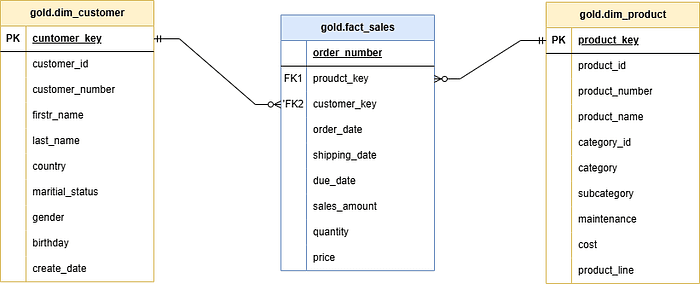
With this, all the work that has been done is documented and the relationships between the different tables is clear.
Data Catalog
Data catalog is a document that will explain everything about the data model e.g. the columns the tables, the relationships, etc.
Data Flow Diagram
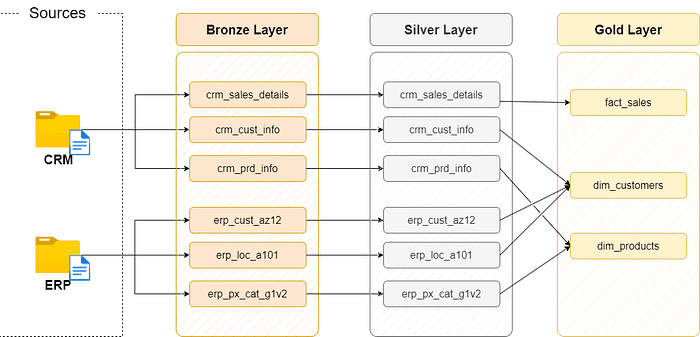
Like this you come to the end of the project and this way you have learned all the best practices to build a Data Warehouse in your organization.
Thanks for reading!